A Peek At Vodhin's Midi Studio
This part of my website is for those who want to know how Midi works. Advanced Midi Artists may find it lacking in information or seemingly incorrect. I must admit that there is a whole lot behind Midi that haven't the foggiest notion about- and probably will never know. I also would like to say that I am not a musician or an artist, I just like playing on my computer and have a bit of fun.
This section is for those who'd like to have some fun, too, but don't know where to start. Well, first, think about upgrading your sound card, especially if it sounds like a toy keyboard. Most new sound cards of the better type probably come with software for making music. Read the box and see if it does. Your computer may already have software installed by the manufacturer that can edit midi files. Dig around your programs' menu to see what you have. If you're not sure wether or not a program can edit a midi file, first see if it can open one, then see what you can do with it.
A (not so) Brief History of Electronic Music
Music on a computer has come a long way- especially for PC users. As I remember, Mac users had some really neat toys in the late '80s and early '90s. Semi Professional Keyboards could hook to them and record tracks in notation and such. The PC, still basically for crunching numbers, had to wait almost 5 years before they would catch up.
Somewhere around '93 or '94 sound cards began to take synthesis seriously (say that one, sylvester, and you could irrigate a small drought stricken country). One of the first I got was a SoundBlaster AWE 32 from Creative Labs. What a joy that was to hear synthesized music that didn't sound like buzzers underwater.
Where The Sound Comes FromWhat's the big deal then, you ask. Well, lets look at what synthsis is. When you play a recording or listen to the radio or tv, no matter what system you have, an electrical current is driving some kind of speaker. The speaker vibrates the air and we hear sound.
This sound came from some kind of device that for all intent and purposes did exactly the opposite, using soundwaves in the air to to make that electrical current. The telegraph is one of the first examples, but a finger tapped out a pattern into the wire (the first form of digital, perhaps?) which was mechanically reproduced as a tap on the other end.
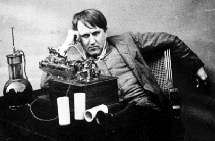 Thomas Edison created a purely mechanical way of recording sound by inscribing a drum with a fine needle. When the drum played back his first recording, "Mary had a little lamb..." came out nice
and clear (for the time, at least).
Thomas Edison created a purely mechanical way of recording sound by inscribing a drum with a fine needle. When the drum played back his first recording, "Mary had a little lamb..." came out nice
and clear (for the time, at least).
Alexander Graham Bell also did something like this but used electricity, like the telegraph, to carry the sound from one end to the other. There's a bit of a debate over who actually made the first telephone, but I'm not going there. Bell's system is the basis for our audio systems today, coupled with Edison's ideas for recording and playback.
From then on, many contraptions have been invented to try to get the electricity to drive the speaker
and make intelligible sounds without the first part of the system- commonly known as the microphone.
Electronic Music was born from these experiments.
A more complete history of Electronic Music can be found at Obsolete.com's 120 Years Of Electronic Music. Be sure to check out "The Theremin", an elecronic instrument that's played by simply waving your hands in the air.
The next major step in Electronic Music was the addition of a controller that could be easily played- a piano like keyboard was tied to various electronic equipment and the MOOG systhesizer was born.
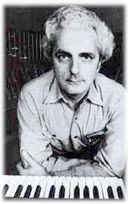 In 1964 Robert Moog began to manufacture electronic music synthesizers. Moog's synthesizers were designed in collaboration with composers Herbert A. Deutsch and Wendy Carlos, who's input helped shape the electronic instruments of today. Their need to control more than just pitch and volume, to have touch sensitivity and other expresive functions on the keyboard inspired Bob Moog and paved the way for the rest of us. Thank you!
Wendy is best known for her electronic music, but that's not all she's into! Wendy's site is really really fantastic place to dig around in. I highly recommend a visit there!
It was Wendy Carlos' work that really inspired me to start playing the keyboard. Her 'realizations' of classical works by Bach, Bethoven and others, as well as her own compositions, let me hear the music in a whole new way- Bright, crisp, and, well, new. Fresh would be a better word.
Someday, maybe, I'll be as good as she is, imagining whole new instruments that could not actually exist in reality. For now, picking out and improving the overall tonal qualities of a given piece of music makes me happy. Heck, just figuring out notes does that, too.
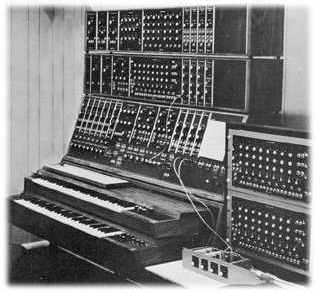 Early electronic synthesizers were made up of many cumbersome parts, patched together with a variety of cables and controlled by numerous knobs, dials, and switches. A key point here is that these machines didn't have a 'preset' for, say, a trumpet. You had to adjust almost all the controls each time you wanted a certain sound.
That may have been a pain, but artists like Wendy Carlos would bless us with entirely new sounds, fidling with the dials until the 'right' sound was produced. Few people could - or would - use them, and the audience was sharply divided into those who loved the new sounds, and those who hated them.
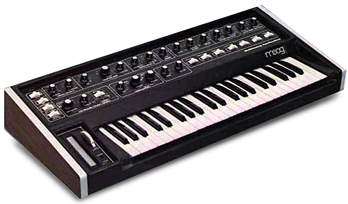 Refinements in miniture electronics and improved controls helped the keyboard reach into mainstream pop music. Many bands of the '70's started using them for that new edge in at least a few songs, but it wasn't until the hair bands of the '80s that gave the keyboard a permenant home on stage. As electronics got smaller, so did the synths.
Analog vs. Digital Analog synths are almost all but a memory today, existing in some music labs in schools, or lost in dusty cellars. That doesn't mean that they're obsolete, though. The sound from these machines cannot be matched easily by today's digital equipment - but digital is catching up. (My opinion. Fact is that digital can overcome analog, it's just that I haven't come across any new and innovating recordings - not that I've really been looking...) Analog basically is the direct control of the current feeding the speakers, while digital is a bit more complicated.
Most Digital synths since the late '80s use a process known as Frequency Modulation, or FM Synthisis. FM has always been part of the analog process, but the new microchips could now digitally control this process, thus enabeling instant switches between different sounds. And the sounds allways sounded the same every time you switched back to it.
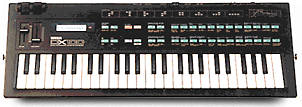 You could do that with the old analog synths, too. Just draw up a table on a piece of paper for each sound's exact setting for every knob and dial. How many long haired metal heads would do that? The only difference between the various models out there were the quality of the parts, and programming behind the sounds' setup.
While it was posible to program your own sounds on these boards, very few musicians actually bothered, and even fewer could figure out what all those strange numbers on a calculator sized LCD screen meant. But that didn't matter- the keyboards had the sounds people wanted to hear. When a band wanted a 'synth' in their song, what most were referring to was the very crude, buzzy synth strings used in songs like "Jump".
Today's synths, by contrast, vie to compete with the real instruments, employing 'wav table' sounds - short digitized recordings of the actual instruments instead of pure or true sound synthesis. These are known as sound fonts. Like type faces for your writing, these are 'sets' of sound samples (waves) for your sound card. Sound fonts are available for download from a variety of sources on the web, but this is something I have yet to explore. Depending on the capabilities of your sound card, you might just be able to improve it's midi sound quality.
Midi Music and the Computer
What is MIDI? Musical Instrument Digital Interface. It was developed to allow one keyboard to control other keyboards, external sound generators, effects processors, even professional mixing baords and recording equipment. The uses are limitless. As computers evolved, whole systems could be automated by a Mac, and later, PCs. Soon, software programmers began to take advantage of the format and soundcards began to improve. Gaming may have been the single greatest driving force behind the computer based midi format.
General Midi is a standard set of sounds and controllers, a listing of instruments in a specific order. Early midi did not have a standard order for instrument line-up. This meant that when a file was moved from one piece of equipment to another, an electric guitar part might actually come out as a bagpipe. Not good. With general midi, when I program a piece that calls for a bright piano, it should get played on your machine in whatever bright piano you have, not, say, a kettle drum.
Midi also handles a variety of other data, known as controllers. Controllers work behind the music to perform various tasks that go beyond the notes and rests of the song. Controllers can be added to make a flute turn into a sax for a certain part, adjust volume for the track (or the whole song), make the part switch from the left speaker to the right, and a host of other needed performance effects. Some instruments requre these extras just to sound right.
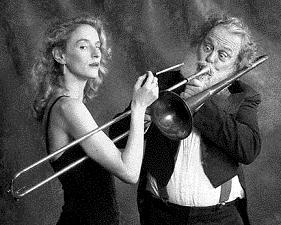 Take a trombone. A farely simple instrument on it's own, but rather tricky to be reproduced by a computer. The trombone's notes are picked out by it's sliding tube, and thus has an infinately variable range between it's highest note, and it's lowest. Composers and performers want to take advantage of that feature, so trombones are often featured where the note has to slide up or down the scale. It is purely analoge in nature.
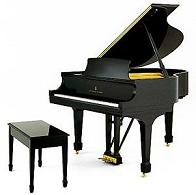 Pianos, on the other hand, are closer to digital in nature. Each note is set to its exact pitch with no ability to slide up and down between them. It is possible to fool the ear, though. With the right key pressure and use of sustain and dampening pedals, a slide effect can be achieved. But it's still just individual notes when youbreak it down.
To re-create the slide of a trombone via midi on a computer, a similar idea is employed using something called Pitch Bend. Pitch bend on a synth allows a seemingly analog curve or "bend" in the pitch of the note. When connected to a computer that's recording the midi data, the effect can end up as hundreds, even thousands of individual 'steps' between one note and the other. For performers who do most of their work strictly on a computer, like myself, that can be very tedious if you don't have software that can let you 'draw' the curve of the pitchbend instead of typing in eash step's value. I've been using Voyetra's Digital Orchestrator Pro for many years.
Putting In The Notes. You'll need some kind of software to record a midi file. Then there are 3 ways of recording a midi song. First is Step Recording. Step recording works by placing each and every note and rest into the song one by one, a very tedious method that usually sounds very mechanical.
Second is Real Time recording. Real time requires a keyboard of some kind connected to your computer and software that can record in real time (most recorders do). You select a track to record, click start, and begin playing. The computer then records your performance, including controller effects. This is a great way to record because you get a "Live" feel to the work right out of the gate. You also get any errors, but here's the really neat bit: you get to go back and correct them in step mode.
The third way of recording is Punch-In/Punch-Out. Punch recording is like real time, except it is generally used for short sections. With punch recording, most software will allow you to "Loop" the section as you record, giving you at ability to add parts- really great for putting down drums.
Of course, your tallent will affect how you want to record. In my case, I tend to do very well playing individual parts, but really suck when I try to use two hands. I just don't have the gift. But I do have the knowledge of the software I use (and I'm still learning new tricks) and so I can work around my lack of performance tallent. So can you. I usually step record a bass line and melody, then punch in other parts. Once a track is laid down, I go back to step mode and "brush up" the notes and add any needed controllers.
I've had a chance to try out several different programs for midi editing, but have returned to Voyetra only because their program does what I want (for the most part) and because it is familiar to me. The various functions are quickly accessable and it isn't loaded down with fancy graphics or skins. It's nice and simple.
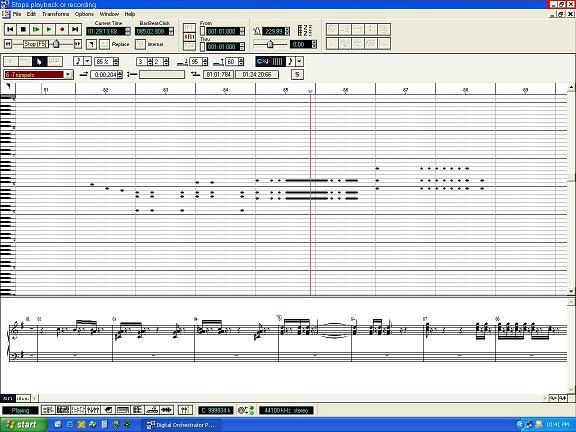
Here is the focus of my work using Voyetra's Digital Orchestrator Pro in its Piano Roll window. Just draw in the notes on the graph in the center part of the screen. Move them up or down to change the note (see the piano keyboard on the left?), drag the note left or right to change it's position in time, or stretch the note(s) to change its length. Rests are automatically inserted between notes. Double clicking on a note (or block of notes) brings up a window that lets you change the properties of it. This is usefull if a particular note or section should be louder or softer, or you need to really fine tune its start/stop time.
At the bottom of the window is the actual notation of the notes on the main graph, usefull if you can read music (unlike myself, who has to sit there and count lines...) but not really needed to make your songs. Below that are controls for switching between windows, zoom control, and a brand new feature that was desparately needed: A Graphic Controller Editor. This allows you to graphically edit those special events, like pitch bend, on a special grid that replaces the notation at the bottom of the main window.
Fine Tuning Your Work. At some point you'll want to set up the different instruments in your song. On the program I use the easiest way to do this is in Track View - where you can see all the tracks at once. Controls for soloing or muting tracks are also available, usefull for compairing different sounds with others.
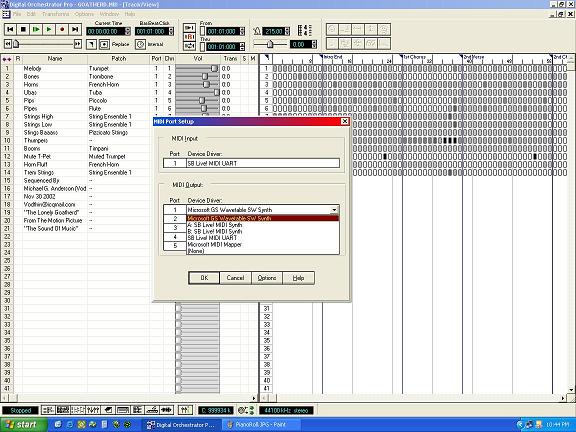
Here is the program's Track View window. In this picture, I have a dialog window open in the middle for selecting which synthesizer I want to use. This is one way of telling this program what set of sound fonts to use. I'll get into this feature in the Midi Channel section below. Track view also lets me copy tracks or sections of tracks in one go. This lets me record one track with all the little "fluff" bits in and later seperate the bits onto seperate tracks for different instruments or spatial position. What's that? You ask. In a nutshell, it's where the instrument sounds like it's coming from. Origional stereo recordings were done by placing microphones along the room's width, one third and two thirds the way into a room.
When played back on speakers placed in the same positions as the microphones, a listener would hear the performance exactly as it was recorded. Even if you moved around the room, you'd hear the sound from an equal position as if you were at the live performance. Listeners can even identify a near or distant instrument from the others. You can get a similar affect if you adjust the pan of different instruments along with their volume and reverberation amounts. In MIDI, reverb may not always work properly from machine to machine- again that depends on the sound cards installed on them.
Right now I tinkering with a "marching band" idea for the song '76 Trombones'. I want to get the feel of a marching band passing by the listener. Panning tracks with the pan controller setting would work, but that would only be part of the trick. By panning multiple tracks that crescendo in and out at different points during the song, I can more faithfully reproduce the effect of the different instruments passing by. And I can see a visual presentation of the parts as well, very helpfull for this work. Of course, the final result would either be visualized as either a very long marching band, or one that encircled the listener- we'll have to see.
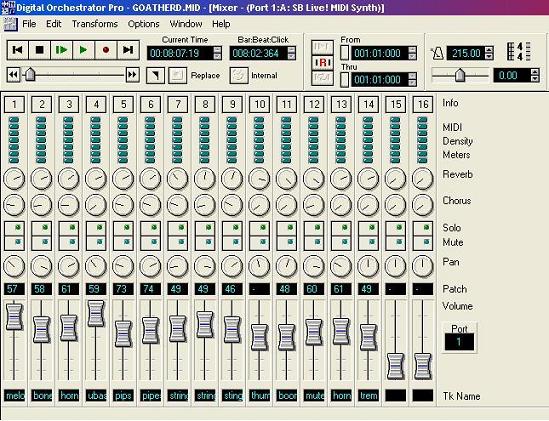
This is a view of Digital Orchestrator Pro's Mixer window. With a layout that is practically identical to a studio mixing board, I can adjust each MIDI Channel's MAIN volume, pan, reverb, and chorus. If no controllers are added in the tracks, these will govern the song's overall performance. Neat tip here: I can click Record here and the "performance" of my controller changes on the mixing board will be added into the tracks in Real Time playback. Too bad there's only one mouse pointer.
Midi Channels vs. Midi Tracks. Different parts of a song can be recorded on individual tracks, or all on one track. Think about a pianist. One person playing. Two hands. If you recorded in real time, you'd end up with one track. You could also record each hand onto it's own track individually. Pan the tracks left and right and you'd get a nice stereo separation, right?
Not exactly. Volume, Pan, Chorus, and other effects work on Midi Channels. There are only 16 channels available in the current Midi format. The Instrument selection also depends on the Midi Channel. If I have 3 tracks all on Channel 1, and I change the instrument on Track 2, then all the tracks assigned to channel 1 will also change. So if I want to have my left hand/right hand setup as mentioned before, I'd need 2 Channels as well as Tracks. Keep in mind that if you place an effects controller, like pan, into one individual track then that pan control will affect all of your other tracks on the same midi channel. As you can see, a bit of planning before you start recording can greatly improve the outcome of your work, and can make it easier to change things down the road without ripping your song to pieces first.
Return to Vodhin's Midi Page